Oversharing exposure · Microsoft 365 Early access
Find the files your whole company can open.
Salary sheets, board papers and HR cases shared too widely years ago. We find the SharePoint and OneDrive files too many people can open, and show which of them are sensitive.
Who can open what
Three ways a file ends up open to too many people.
Permissions set lower down are followed, not guessed: each file counts by who can really open it.
Whole company
“Everyone except external users” or “Everyone” added to a site, library, folder or file, and public Microsoft 365 groups.
Anyone links
Sharing links that work for anyone who has them, with no sign-in.
Large groups
Groups and shares that reach a large part of your staff, counted by real membership.
Sample report
See the report before you connect anything.
Get the real oversharing readiness report, run on a fictional company, in your inbox — the PDF your board would see.
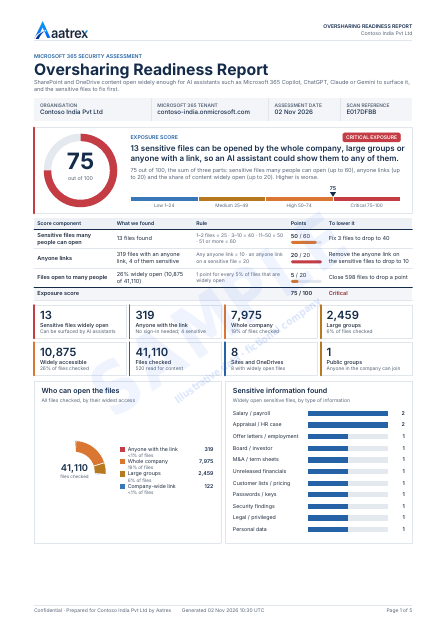
- An exposure score from 0 to 100, with what would lower it
- Who can open the files: whole company, anyone links, large groups
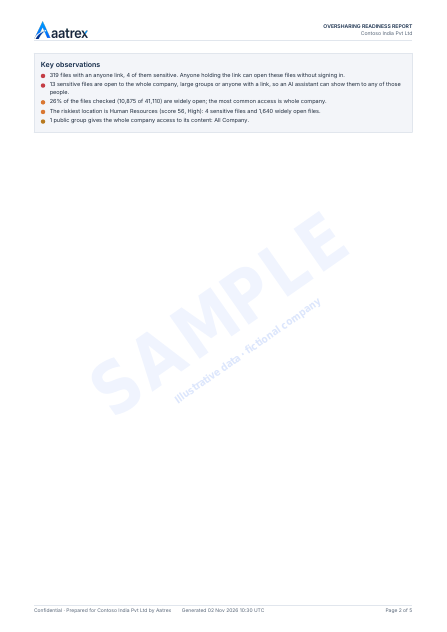
- Sensitive files and sites ranked, with the first things to fix
Sensitive files
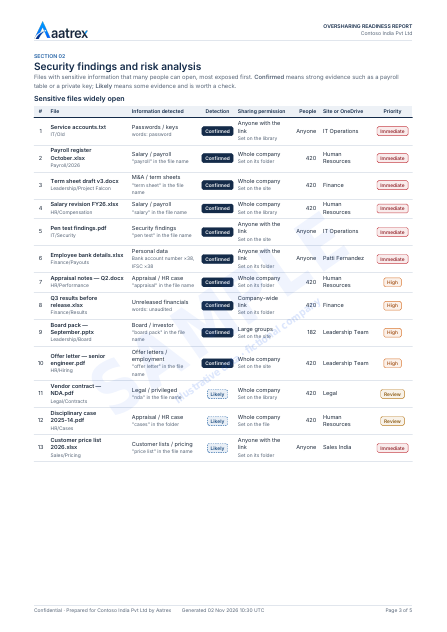
Which open files are sensitive.
We look at the file name, its folder and site, and the text inside. Each finding says why it was flagged and how sure we are.
- Salary and payroll
- Appraisals and HR cases
- Offer letters and contracts
- Board and investor papers
- M&A and term sheets
- Legal and privileged
- Results before release
- Customer lists and pricing
- Passwords and keys
- Security and audit findings
- Personal data (Aadhaar, PAN, bank…)
Personal data in mail as well as files? Aatrex Discover checks mail, OneDrive and SharePoint for Aadhaar, PAN, bank and health data.
How it works
Connect, scan, then fix what matters first.
Connect
Your Microsoft 365 admin approves a read-only app. It can read sites and files, and change nothing.
Scan
We check every SharePoint site and OneDrive, work out who can open each file, then read only the files many people can open.
Score and report
You get a score from 0 to 100, the most exposed sensitive files and sites, and the first things to fix.
Reports
A short PDF for your board and an Excel workbook for IT, with every site, sensitive file and access path.
You check the findings
Mark each finding Correct or Wrong in the console. Wrong ones leave the score and the report.
Your data
Your data stays safe
- Read-only: Aatrex cannot change, share, move or delete anything in Microsoft 365.
- We only open files that many people can already open. Private files are never read.
- Files are read in memory and dropped after checking. We never store the values we find.
- Hosted in India.
- Delete your results any time. They are deleted 90 days after your last scan.
- Remove the app from Microsoft 365 any time.
Not done yet
- Fixing access for you: today it reports, you fix in Microsoft 365.
- Teams chats and channel messages.
- Shared and group mailboxes.
- Text inside images and scanned PDFs.
- Google Workspace.
The report says which sites and files it could not read.
FAQ
Questions
Why does this matter for AI assistants?
How is the score worked out?
What if a file is marked sensitive but isn’t?
Does it need Microsoft E5 or other add-ons?
How long does a scan take?
Early access: A free pilot licence while it’s in testing — we agree the number of users with you. Prices come later; we will quote before any paid plan.
Check your tenant before your AI rollout.
Join early access and we set you up with a free pilot while the scan is in testing.